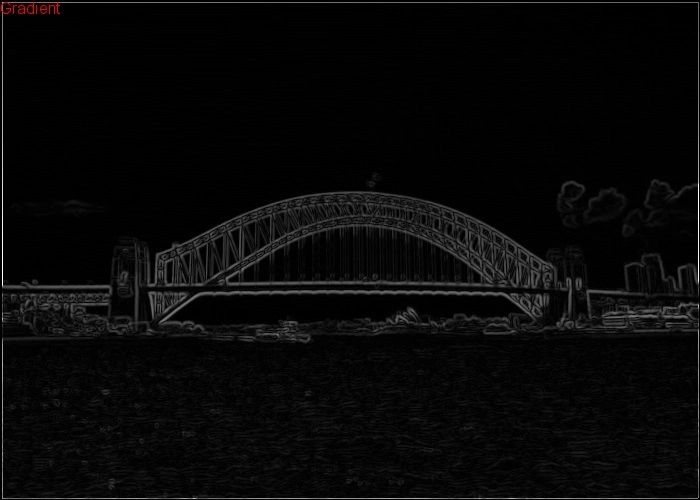
First Published 18th Feb 2016
So I have other things I am meant to be doing at the moment but whilst I wait for the PCB’s for the IoT Project I decided why not look into simple ways to optimise the Canny Edge Detection algorithm implementation that I wrote in C++.
If we look at the console output from the initial C++ port;
It is clear that the two slowest parts of the algorithm are the gaussian blur and the gradient intensity pass and together they take 86% of the total time. With any optimisation review, first look at the code taking most of the time as this is likely where the greatest gains can be achieved. It is all about gain vs benefit. If we can only improve the overall performance by a few percent, it may not be worth the effort unless speed is absolutely everything, but if we can with some simple changes increase performance by a substantial percentage, then maybe it is worth it.
It is also worth noting that the console output above was from yesterday and today when I run it, the timings are very different so I will use the timings today for all the relevant comparisons.
What is worth the effort is all based on the purpose of the code. If the code is about maximum frame rate such as this code may well be, the speed may well be of the essence.
Enough of the discussion about whether to optimise or not, I will just get on it.
The first place I will look to optimise is the gradient intensity pass as it is taking 60% of the total time.
See the code below, this is an snippet from the original implementation I did.
//---------------------------------------------------------------------------------------------
// --------------------- Gradient intensity pass -----------------------
// Define image to store gradient intensity
CImg < unsigned char > imggrad(width, height, 1, 1, 1);

// Define image to store gradient direction
CImg < unsigned char > imggraddir(width, height, 1, 1, 1);

// Get current time
currenttime = (double) clock();

// Apply Gaussian Blur
cout << "Gradient intensity pass\r\n";

// Definitions
int pix[3] = {0,0,0};
int gradx = 0, grady = 0;
int graddir = 0, grad = 0;

// Get pixels and calculate gradient and direction
for (x = 1; x <= width - 1; x++) {
  for (y = 1; y <= height - 1; y++) {

    // Get source pixels to calculate the intensity and direction
    pix[0] = imgblur(x, y, 0, 0); // main pixel
    pix[1] = imgblur(x - 1, y, 0, 0); // pixel left
    pix[2] = imgblur(x, y - 1, 0, 0); // pixel above

    // get value for x gradient
    gradx = pix[0] - pix[1];

    // get value for y gradient
    grady = pix[0] - pix[2];

    // Calculate gradient direction
    // We want this rounded to 0,1,2,3 which represents 0, 45, 90, 135 degrees
    graddir = (int)(abs(atan2(grady, gradx)) + 0.22) * 80;

    // Store gradient direction
    imggraddir(x, y, 0, 0) = graddir;

    // Calculate gradient
    grad = (int) sqrt(gradx * gradx + grady * grady) * 2;

    // Store pixel
    imggrad(x, y, 0, 0) = grad;

  }
}

// Display time taken to process image
timetaken = (double)((double) clock() - currenttime) / CLOCKS_PER_SEC;

cout << "- Calculating the intensity gradient of the image took " << timetaken << " seconds\r\n\r\n";

// Display gradient intensity image
CImgDisplay main_disp_grad(imggrad, "grad");

// Display gradient direction image
CImgDisplay main_disp_grad_dir(imggraddir, "graddir");
Two things jump out right away, the square root function and the atan2 function. Calculating the square root accurately is generally an iterative process and the greater the accuracy means the longer (more iterations) it may take.
Now considering that our image is 700*500 pixels, that is 350,000 pixels so any optimisations I make inside any of these loops will effect all 350,000 pixel operations. The possible performance gain could be substantial.
If you have ever looked into mathematical optimisations you will know that to calculate the hypotenuse is sqrt(x*x + y*y). The squaring calculation of x*x is going to be very fast and at the CPU level this is only a single instruction. The time will be the square root function itself.
I want a simple hypotenuse approximation algorithm, the higher the accuracy the better but speed is critical. After doing some research online I found a few suggestions for a hypotenuse approximation function such as the one below;
hypotenuse=(short side * (sqrt(pi) – 1)) + long side
The above calculation is an approximation, worst case it will overestimate by 8% however the closer in length the long and short sides are the better the accuracy. As the image has already had a Gaussian blur applied to it, the delta in any gradient on the x compared with y axis is going to be closish and as such the above calculation should provide a result within 1 or 2% of the actual hypotenuse calculation.
If I further reduce the calculation;
hypotenuse=(short side * 0.414) + longside
It is clear to see that I now have a mathematically very simple formula to solve. Notice how I refer to short and long side, we need to ensure that the correct lengths are used in the correct places otherwise the results are meaningless.
if (side_x > side_y) {
hypot=(side_y * 0.414) + side_x
} else {
hypot=(side_x * 0.414) + side_y
}
Ok, so time to plug in the new algorithm.
// --------------------- Gradient intensity pass -----------------------
//---------------------------------------------------------------------------------------------
// Define image to store gradient intensity
CImg imggrad(width, height, 1, 1, 1);
// Define image to store gradient direction
CImg imggraddir(width, height, 1, 1, 1);
// Get current time
currenttime = (double)clock();
// Apply Gaussian Blur
cout << "Gradient intensity pass\r\n";
// Definitions
int pix[3] = { 0,0,0 };
int gradx = 0, grady = 0;
int graddir = 0, grad = 0;
// Get pixels and calculate gradient and direction
for (x = 1; x <= width-1; x++) {
for (y = 1; y <= height-1; y++) {
// Get source pixels to calculate the intensity and direction
pix[0] = imgblur(x, y, 0, 0); // main pixel
pix[1] = imgblur(x - 1, y, 0, 0); // pixel left
pix[2] = imgblur(x, y - 1, 0, 0); // pixel above
// get value for x gradient
gradx = pix[0] - pix[1];
// get value for y gradient
grady = pix[0] - pix[2];
// Calculate gradient direction
// We want this rounded to 0,1,2,3 which represents 0, 45, 90, 135 degrees
graddir = (int)(abs(atan2(grady, gradx)) + 0.22) * 80;
// Store gradient direction
imggraddir(x, y, 0, 0) = graddir;
// Get absolute values for both gradients
gradx = abs(gradx);
grady = abs(grady);
// Calculate gradient
if (gradx > grady) {
grad = (grady * 414) / 1000 + gradx;
}
else {
grad = (gradx * 414) / 1000 + grady;
}
// Store pixel
imggrad(x, y, 0, 0) = grad * 2;
}
}
// Display time taken to process image
timetaken = (double)((double)clock() - currenttime) / CLOCKS_PER_SEC;
cout << "- Calculating the intensity gradient of the image took " << timetaken << " seconds\r\n\r\n";
// Display gradient intensity image
CImgDisplay main_disp_grad(imggrad, "grad");
// Display gradient direction image
CImgDisplay main_disp_grad_dir(imggraddir, "graddir");
Just to ensure I am working with integers and not floating point, rather than multiple by 0.414, I multiply by 414 then divide by 1000, this gives the same result but uses integers. I have done this so that even simple processors (such as a Micro-controller) without an FPU can execute this quickly as two instructions both single clock cycle (Multiply then a Divide) all in integers.
Time to see if this has improved the performance at all. As with any statistical analysis, we will need a few timing samples to calculate a mean rather than relying on a single sample. A single sample might be faster or slower depending on what the PC is doing in the background.
Non Optimised Implementation (Gradient pass)
Sample 1 – 0.094 seconds
Sample 2 – 0.084 seconds
Sample 3 – 0.087 seconds
The samples are all fairly consistent and as such I will take an average of the three (0.088 seconds)
Optimised Implementation #1 (Gradient pass)
Sample 1 – 0.077 seconds
Sample 2 – 0.068 seconds
Sample 3 – 0.077 seconds
Again, the samples are all fairly consistent and as such I will take an average of the three (0.074 seconds)
It is clear than this simple change has reduced the average time this part of the algorithm takes from 88 ms to 74 ms or a 16% increase in performance.
Going back to my earlier point, the second aspect of the pass I believe there is scope for optimisation is the atan2 function. For argument sake and to save the work in implementing an alternative, I will first remark that line and check the change in timing. Obviously removing this line will result in the rest of the edge detection process failing but for now, I am only concerned with the change in time taken to execute and whether or not I should spend time in optimising that line.
Optimised Implementation #1 (Gradient pass with atan2 line remarked)
Sample 1 – 0.01 seconds
Sample 2 – 0.011 seconds
Sample 3 – 0.007 seconds
Again, the samples are all fairly consistent and as such I will take an average of the three (0.0093 seconds)
This shows a huge increase in performance. From 74 ms to 9.3 ms, the result is an 800% increase in performance. A simple check like this easily highlights areas that can do with optimisation.
Today the average time for the entire algorithm to run has been 120 ms or about 8 fps.
Remember that I want more than 60 fps and on my PC that should be easy to achieve with further optimisation but for now, I will optimise the atan2 line and see what improvement that offers.
Doing a little research on Google I found Link: atan2 approximation and it has some psuedo code for a simple approximation algorithm.
a := min (|x|, |y|) / max (|x|, |y|) s := a * a r := ((-0.0464964749 * s + 0.15931422) * s - 0.327622764) * s * a + a if |y| > |x| then r := 1.57079637 - r if x < 0 then r := 3.14159274 - r if y < 0 then r := -r
I have implemented this in the code below;
//---------------------------------------------------------------------------------------------
// --------------------- Gradient intensity pass -----------------------
// Define image to store gradient intensity
CImg imggrad(width, height, 1, 1, 1);
// Define image to store gradient direction
CImg imggraddir(width, height, 1, 1, 1);
// Get current time
currenttime = (double)clock();
// Apply Gaussian Blur
std::cout << "Gradient intensity pass\r\n";
// Definitions
int pix[3] = { 0,0,0 };
int gradx = 0, grady = 0;
int graddir = 0, grad = 0;
double tempa = 0, temps = 0, tempr = 0;
// Get pixels and calculate gradient and direction
for (x = 1; x <= width-1; x++) {
for (y = 1; y <= height-1; y++) {
// Get source pixels to calculate the intensity and direction
pix[0] = imgblur(x, y, 0, 0); // main pixel
pix[1] = imgblur(x - 1, y, 0, 0); // pixel left
pix[2] = imgblur(x, y - 1, 0, 0); // pixel above
// get value for x gradient
gradx = pix[0] - pix[1];
// get value for y gradient
grady = pix[0] - pix[2];
// Calculate gradient direction
// We want this rounded to 0,1,2,3 which represents 0, 45, 90, 135 degrees
// The follow code replaces graddir = (int)(abs(atan2(grady, gradx)) + 0.22) * 80;
// atan2 approximation
if (max(abs(gradx), abs(grady)) == 0) {
tempa = 0;
}
else {
tempa = min(abs(gradx), abs(grady)) / max(abs(gradx), abs(grady));
}
temps = tempa * tempa;
tempr = ((-0.0464964749 * temps + 0.15931422) * temps - 0.327622764) * temps * tempa + tempa;
// Now sort out quadrant
if (abs(grady) > abs(gradx)) tempr = 1.57079637 - tempr;
if (gradx < 0) tempr = 3.14159274 - tempr;
if (grady < 0) tempr = -tempr;
graddir = (int)(abs(tempr) + 0.22) * 80;
// Store gradient direction
imggraddir(x, y, 0, 0) = graddir;
// Get absolute values for both gradients
gradx = abs(gradx);
grady = abs(grady);
// Calculate gradient
if (gradx > grady) {
grad = (grady * 414) / 1000 + gradx;
}
else {
grad = (gradx * 414) / 1000 + grady;
}
// Store pixel
imggrad(x, y, 0, 0) = grad;
}
}
// Display time taken to process image
timetaken = (double)((double)clock() - currenttime) / CLOCKS_PER_SEC;
std::cout << "- Calculating the intensity gradient of the image took " << timetaken << " seconds\r\n\r\n";
// Display gradient intensity image
CImgDisplay main_disp_grad(imggrad, "grad");
// Display gradient direction image
CImgDisplay main_disp_grad_dir(imggraddir, "graddir");
Optimised Implementation #1 (Gradient pass with atan2 line optimised)
Sample 1 – 0.022 seconds
Sample 2 – 0.025 seconds
Sample 3 – 0.021 seconds
Again, the samples are all fairly consistent and as such I will take an average of the three (0.0226 seconds)
The result is 22.6 ms down from 74 ms. Not quite the improvement I was hoping for still very substantial and with some more work and removing the floating point math, replacing it with large integer math I am sure I could halve this time again.
However, I have achieved 300% improvement in performance and dropped the overall time take for the Canny Edge Detection algorithm from 120 ms to 44 ms with less than 2 hours of work today.
I can see that there are some errors in the algorithm, for example the results from the gradient angle are not correctly aligned but for the sake of this exercise, performance is key and I have achieved a substantial performance improvement. With another hour or two I could fix those bugs and still have the performance at 44 ms per image.
At 44 ms per image, this algorithm is now pushing well over 20 fps reliably up from 8 fps. I want better than 60 fps so now I need to look into further optimisations within the pass loops.
My next approach is going to be using memory instead of CImg for handling the pixel data within algorithm passes.
Optimisation 2 – Using Arrays
A quick summary of the changes to the following code is that I am using arrays for each pass instead of CImg constructs and that I have first copied the image with weightings for each of the RGB components to create a greyscale pixel copy in an array.
// Get each pixel and copy to array
for (x = 0; x <= width; x++) {
for (y = 0; y <= height; y++) {
imgsrcgrey[x][y] = imgsrc(x, y, 0, 0) * .2126 + imgsrc(x, y, 0, 1) * 0.7152 + imgsrc(x, y, 0, 2) * 0.0722;
}
}
From that point, each subsequent pass uses an array for the relevant data and that I am not displaying an image after each part of the algorithm, I do however display the final result so you can see the code works.
//---------------------------------------------------------------------------------------------
// --------------------- Gaussian blur -----------------------
// Get current time
currenttime = (double)clock();<
// Apply Gaussian Blur
std::cout << "Applying gaussian blur to image\r\n";
// Definitions
unsigned int blurpixel=0;
signed int dx = 0, dy = 0;
unsigned int pixelweight = 0;
// Define gaussian blur weightings array
int weighting[5][5] =
{
{ 2, 4, 5, 4, 2},
{ 4, 9,12, 9, 4},
{ 5,12,15,12, 5},
{ 4, 9,12, 9, 4},
{ 2, 4, 5, 4, 2}
};
// Get each pixel and apply the blur filter
for (x = 2; x <= width - 2; x++) {
for (y = 2; y <= height - 2; y++) {
// Clear blurpixel
blurpixel = 0;
// +- 2 for each pixel and calculate the weighting
for (dx = -2; dx <= 2; dx++) {
for (dy = -2; dy <= 2; dy++) {
pixelweight = weighting[dx+2][dy+2];
// Get pixel
pixel = imgsrcgrey[x + dx][y + dy];
// Apply weighting
blurpixel = blurpixel + pixel * pixelweight;
}
}
// Write pixel to blur image
imgblur[x][y] = (int)(blurpixel / 159);
}
}
// Display time taken to process image
timetaken = (double)((double)clock() - currenttime) / CLOCKS_PER_SEC;
std::cout << "- Applying gaussian blur to image took " << timetaken << " seconds\r\n\r\n";
Each of the passes has the same amendments to use an array instead of CImg and the change in execution time is substantial. The execution time for the non optimised version of the algorithm today has been sitting around the 120ms, with the two really simple math changes I was able to get the execution time down to 44 ms.
By now using arrays for each pass the total execution time is now 23 ms. In total with a few hours of work today I have optimised the code to give me over 500% faster execution.
Currently with execution time at 23 ms, that gives me a frame rate of > 43 fps. Still not my 60 fps that I wanted but a massive improvement on the 8 fps the original C++ code port provided.
Again, if you are interested in playing with the code, I have uploaded the entire Visual Studio 2015 projects including dependencies to GitHub. Link: GitHub Repository
Now I really should get back to the other things I am meant to be doing today.